 neo.js.cn@gmail.com


WeChat Native (astrbot-plugin-wechat-native) is an open-source plugin that connects AstrBot directly to personal WeChat through the agent-wechat-native /v1 API. Installed directly inside AstrBot without requiring a separate intermediate bridge service, it brings LLM conversations, persona configurations, and AstrBot’s plugin ecosystem to personal and group chats.
Personal messaging integrations often struggle with duplicate replies, replay storms, or lost state across network drops and container restarts. WeChat Native addresses this with persistent Server-Sent Events (SSE) cursor recovery, atomic SQLite deduplication, recall interception, and idempotent outbound receipt verification focused on dependable text conversations.
- Compatibility: AstrBot
4.29.3(>=4.29.3,<5),agent-wechat-native v1.2.0 - Runtime Requirement: Python
3.12+ - Supported Scope: Private text chat, group
@replies, whitelists, isolated per-user group sessions, SSE reconnection, and persistent deduplication. Images, voice, files, and native quoted replies are not currently supported (disable text-to-image for this bot instance).
Key Features & Reliability Design
- Direct
/v1API integration: Runs inside AstrBot and communicates directly withagent-wechat-nativeREST and/events/streamSSE endpoints without external bridge services. - Private & group
@mentionreplies: Configurable private chat replies and group trigger modes (mentionfor genuine WeChat@mentions,allfor all group text, ordisabled). Manually typed plain-text@nameor@allmessages do not falsely trigger default replies, and multi-segment outputs only auto-mention the sender on the first segment. - Whitelists & isolated sessions: Restrict access by
allowed_users(senderId) andallowed_groups(@chatroomthread IDs), and keep per-member conversation contexts separate inside shared groups withunique_session. - Resilient SSE reconnection: Resumes event streams via persisted decimal string cursors (
afterandLast-Event-ID) while validating/v1/status.serverIdon each connection so rebuilt server instances never silently reuse stale cursors. - Live message filtering & recall handling: Accepts only
origin == "live"text messages created within the last 5 minutes (with a 60-second clock skew tolerance), ignores historical imports or stale backlogs, cancels queued events on message recall, and re-verifies the source message before sending. - Atomic deduplication & idempotent delivery: Automatically maintains an isolated SQLite state database under
/AstrBot/data/plugin_data/astrbot_plugin_wechat_native/, committing message ID deduplication and SSE cursors in a single transaction. Each outbound message records a uniqueIdempotency-Keybefore issuing a singlePOSTand polls receipts on timeout or5xxwithout blind retries. Neither the SQLite state database nor plugin logs store chat message bodies or API tokens.
Architecture & Message Flow Diagrams
1. System Architecture & Working Principle
Running directly inside the AstrBot process, the plugin communicates with agent-wechat-native over localhost (127.0.0.1:6174 in single-host mode) using a shared, read-only mounted /run/secrets/wechat-api-token—eliminating any external intermediate bridge service:
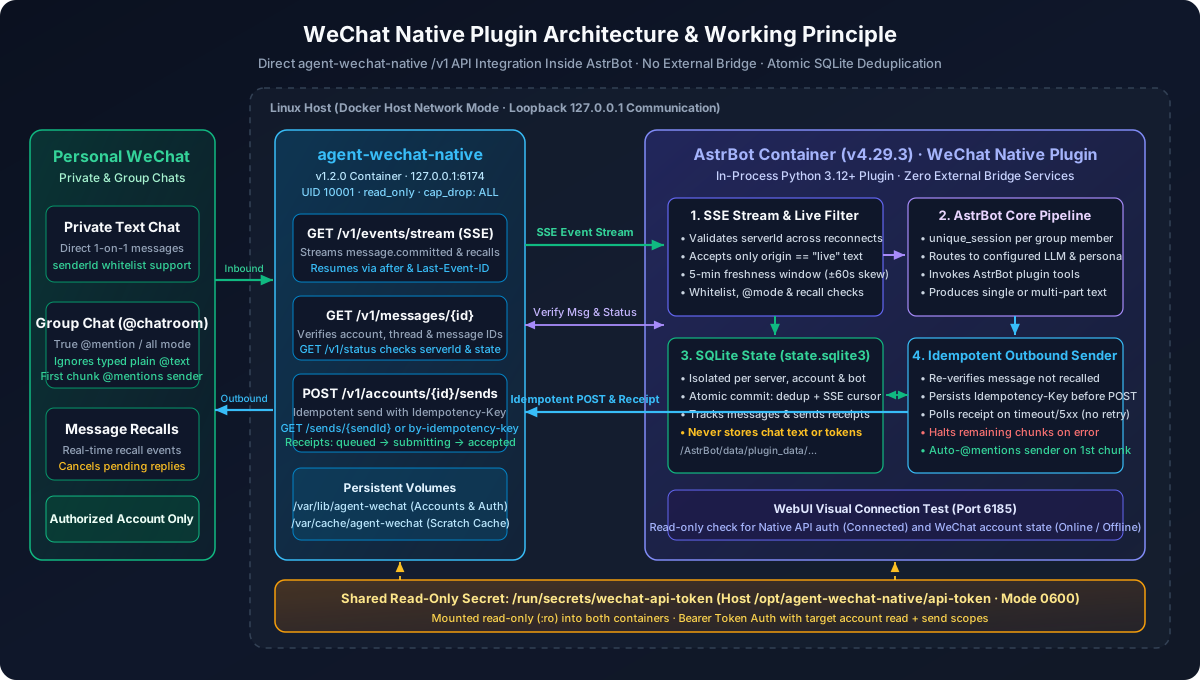
- Connection & Server Identity Verification: On every connection, the plugin checks
/v1/status.serverId. If the Native data directory is rebuilt or replaced at the same URL, the plugin halts and preserves existing state rather than silently reusing a stale cursor. - SSE Cursor Recovery: The plugin subscribes to
/v1/events/streamand resumes seamlessly across network drops using persisted decimal string cursors viaafterandLast-Event-ID. - Isolated Zero-Text SQLite State: Under
/AstrBot/data/plugin_data/astrbot_plugin_wechat_native/, the plugin maintains an isolatedstate.sqlite3per server URL, account, and bot instance. It stores only identifiers, cursors, idempotency keys, and receipt states—never chat message text or API tokens.
2. End-to-End Message Flow & Idempotent State Machine
From receiving an inbound WeChat event to delivering an AI reply, the plugin enforces a two-phase pipeline—Inbound Atomic Deduplication followed by Outbound Idempotent Receipt Verification:
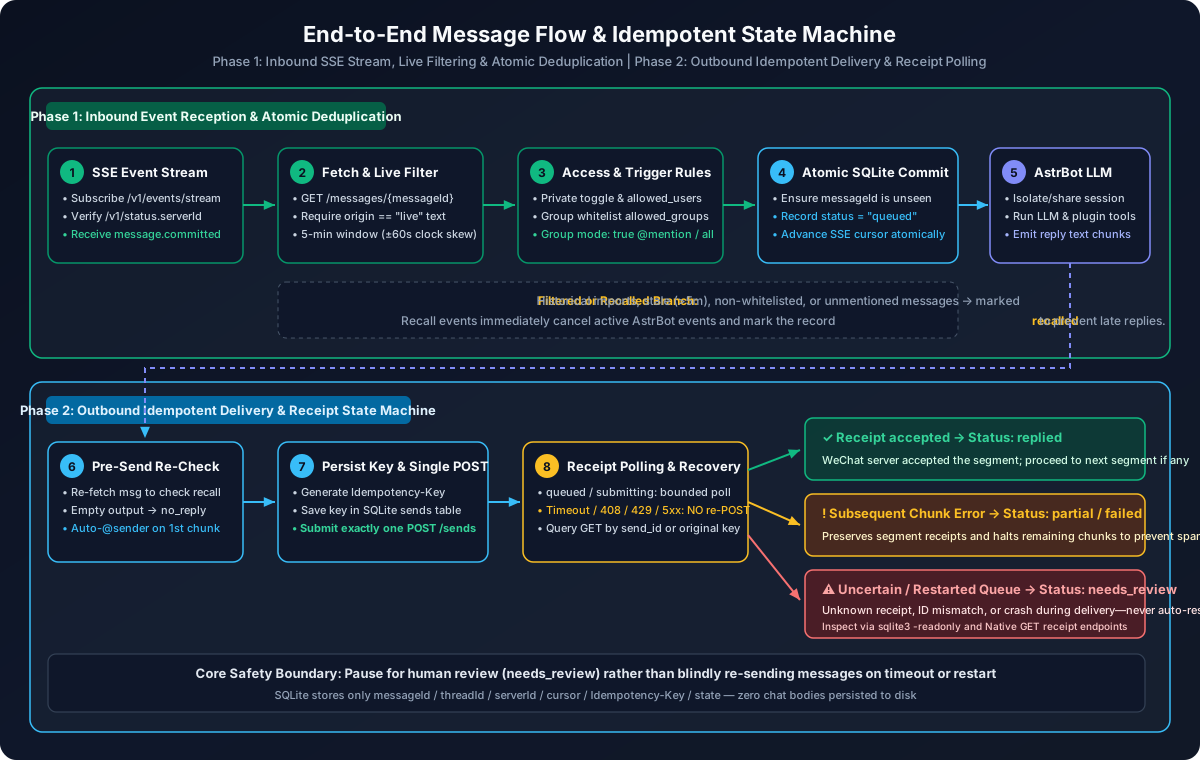
- Phase 1 (Inbound Reception & Atomic Deduplication):
- When
message.committedarrives over SSE, the plugin callsGET /v1/messages/{messageId}to verify account, thread, and message identifiers. - Only live text messages (
origin == "live") within a 5-minute freshness window (±60s clock skew tolerance) are accepted. Historical imports, stale backlogs, non-whitelisted senders/groups, or unmentioned group messages are markedignoredwhile still advancing the cursor. - Verified messages commit their deduplication record (
status = "queued") and advance the SSE cursor in a single atomic SQLite transaction before entering the AstrBot LLM pipeline. If a recall event arrives while queued, the pending AstrBot event is immediately cancelled and markedrecalled.
- When
- Phase 2 (Outbound Idempotent Delivery & Receipt Polling):
- Before sending, the plugin re-fetches the source message to ensure it was not recalled; for multi-segment group replies, only the first segment automatically
@mentionsthe original sender. - Before making the network call for each segment, the plugin persists a unique
Idempotency-Keyin the SQLitesendstable and submits exactly onePOST /v1/accounts/{accountId}/sends. - On network timeouts,
408/429, or5xxresponses, the plugin never re-POSTs; instead, it pollsGET /sends/{sendId}orby-idempotency-keyuntilacceptedis confirmed (status = "replied"). - If any segment fails or remains uncertain, the state transitions to
partial,failed, orneeds_reviewand immediately halts subsequent segments in the same response, preventing duplicate spam in real conversations.
- Before sending, the plugin re-fetches the source message to ensure it was not recalled; for multi-segment group replies, only the first segment automatically
Installation & Configuration
- Start the Native service and log in to WeChat (follow the Docker deployment guide below for a fresh setup).
- In AstrBot Plugin Management → Install from URL, enter:
https://github.com/neozhu/astrbot-plugin-wechat-native - Navigate to Bots → Add Bot, select WeChat Native, fill in the configuration fields below, and enable the bot.
- Select an AstrBot profile for the bot, configure your LLM model and persona, and test private chat and group
@replies.
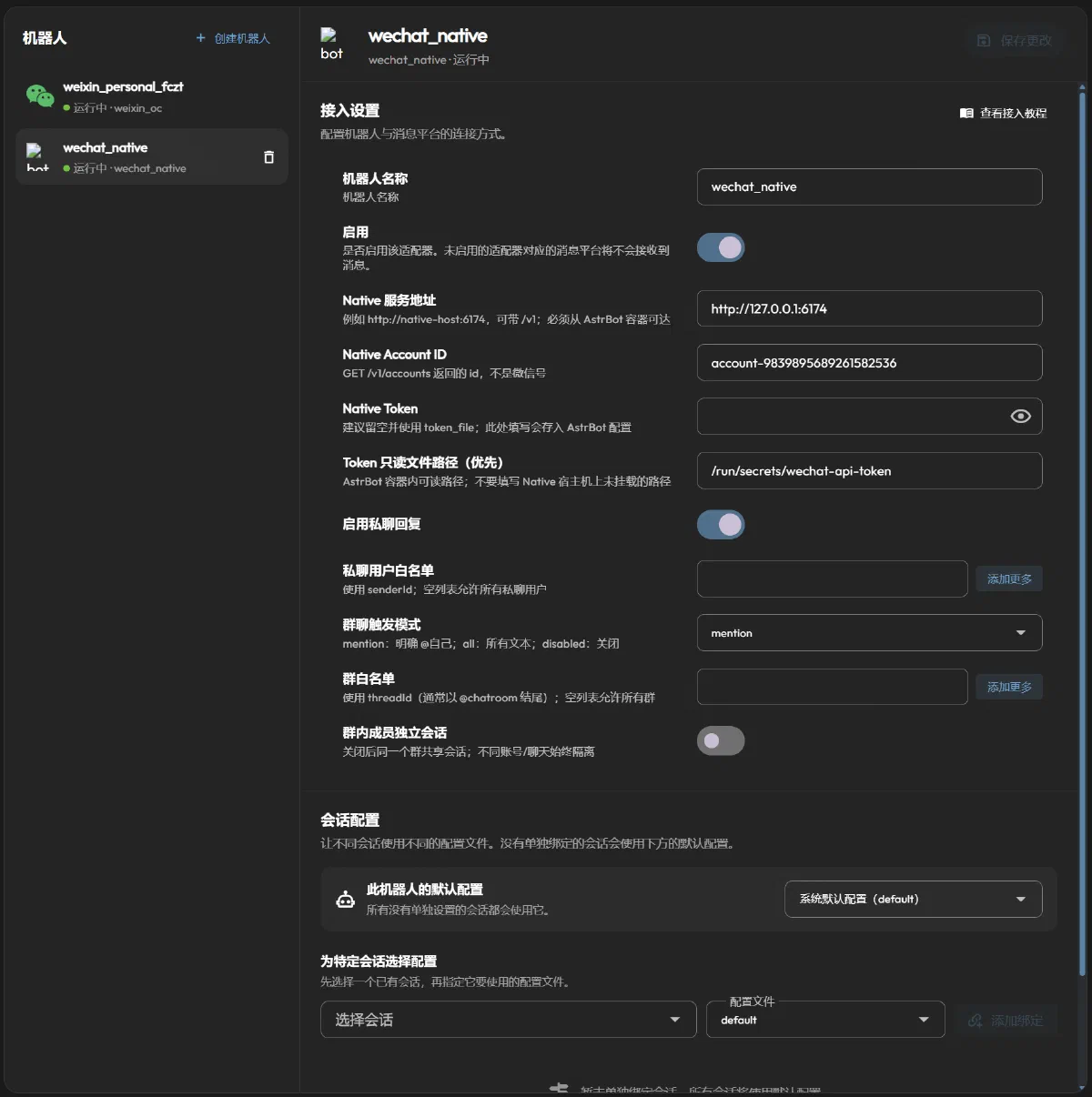
Connection Fields (AstrBot Bot Form)
These fields are configured in the AstrBot bot form (not in Native’s server.toml):
| Field | Description | Docker Example |
|---|---|---|
server_url | Reachable Native URL from AstrBot (with or without /v1) | http://127.0.0.1:6174 |
account_id | Native account id from wx accounts list (not the WeChat ID) | Replace with actual ID |
token_file | In-container path to the mounted token file, prioritized over token | /run/secrets/wechat-api-token |
token | Plain API token stored in AstrBot config when not using a file | Leave empty when using token_file |
The Native token requires read + send permissions for the target account. Restart the bot after replacing a token file.
Reply Rules
| Field | Default | Description |
|---|---|---|
enable_private_reply | true | Whether to reply to private messages |
allowed_users | [] | Private chat senderId whitelist; empty list allows everyone and does not restrict group members |
group_reply_mode | mention | mention: genuine @bot mentions; all: all group text; disabled: no group replies |
allowed_groups | [] | Group threadId whitelist (typically ending with @chatroom); empty list allows all groups |
unique_session | true | Separate conversation sessions per group member; share one session per group when disabled |
User IDs and group IDs can be queried via Native CLI commands wx contacts find <name> and wx chats list.
Docker Environment Deployment: Single Linux Host
Requires Docker Compose and OpenSSL. If you already have an existing deployment, update your original Compose project to preserve project names and data volumes.
Both services use host networking, allowing AstrBot to reach Native via http://127.0.0.1:6174 without exposing ports, while Native continues listening solely on the local loopback interface.
1. Prepare Native Configuration and Token
Create a working directory and the host configuration directory:
mkdir -p wechat-bot
cd wechat-bot
sudo mkdir -p /opt/agent-wechat-native
sudoedit /opt/agent-wechat-native/server.toml
Write the following configuration to /opt/agent-wechat-native/server.toml:
schemaVersion = 1
listen = "127.0.0.1:6174"
dataDir = "/var/lib/agent-wechat"
tokenFile = "/run/secrets/wechat-api-token"
Generate the API token and configure ownership and file permissions (an existing token file will be preserved and not overwritten; the Native container runs as UID/GID 10001, and the token file is kept at 600 for read-only mounting):
sudo sh -c '
  umask 077
  test -f /opt/agent-wechat-native/api-token ||
    openssl rand -hex 32 > /opt/agent-wechat-native/api-token
'
sudo chown 10001:10001 /opt/agent-wechat-native/api-token
sudo chmod 600 /opt/agent-wechat-native/api-token
sudo chmod 644 /opt/agent-wechat-native/server.toml
2. Create compose.yaml
Create compose.yaml in the wechat-bot directory:
services:
  astrbot:
    image: soulter/astrbot:latest
    container_name: astrbot
    restart: unless-stopped
    network_mode: host

    environment:
      TZ: Asia/Shanghai

    volumes:
      - astrbot_data:/AstrBot/data
      - /opt/agent-wechat-native/api-token:/run/secrets/wechat-api-token:ro

    logging:
      driver: json-file
      options:
        max-size: "10m"
        max-file: "3"

  agent-wechat:
    image: ghcr.io/thisnick/agent-wechat-native:v1.2.0
    container_name: agent-wechat
    restart: unless-stopped
    network_mode: host
    user: "10001:10001"
    read_only: true

    cap_drop:
      - ALL

    security_opt:
      - no-new-privileges:true

    environment:
      TZ: Asia/Shanghai
      TMPDIR: /var/cache/agent-wechat

    tmpfs:
      - /tmp:rw,noexec,nosuid,size=64m,mode=1777

    volumes:
      - agent_wechat_native_data:/var/lib/agent-wechat
      - agent_wechat_native_scratch:/var/cache/agent-wechat
      - /opt/agent-wechat-native/server.toml:/etc/agent-wechat/server/config.toml:ro
      - /opt/agent-wechat-native/api-token:/run/secrets/wechat-api-token:ro

    stop_grace_period: 30s

volumes:
  astrbot_data:
  agent_wechat_native_data:
  agent_wechat_native_scratch:
astrbot_datapersists AstrBot settings, sessions, and plugin delivery receipts;agent_wechat_native_datastores Native accounts and login state. Keep these volumes across upgrades—never rundocker compose down -v, which would delete login data.agent_wechat_native_scratchholds temporary runtime snapshots and requires sufficient disk space.- If you run AstrBot as a non-root user, ensure that user has read access to the mounted token file.
3. Start Services and Log In to WeChat
Validate the Compose file and start the containers in the background:
docker compose config --quiet
docker compose up -d
docker compose logs --tail=50 agent-wechat astrbot
On first run, register the local server inside the Native container and list accounts:
docker compose exec agent-wechat wx config server add local --url http://127.0.0.1:6174 --token-file /run/secrets/wechat-api-token
docker compose exec agent-wechat wx --server-name local accounts list
If no account exists yet, create one and follow the prompts to scan the QR code or confirm on your phone (if an account already exists, reuse it rather than creating a duplicate):
docker compose exec agent-wechat wx --server-name local accounts create --alias me
docker compose exec agent-wechat wx --server-name local --account me auth login
docker compose exec agent-wechat wx --server-name local accounts list
Record the returned account id. Keep the official desktop WeChat client closed while using Native.
4. Configure the AstrBot Bot Instance
Open http://<host-ip>:6185, sign in with the initial credentials printed in the startup logs, and change the password. After installing the plugin, fill in the WeChat Native bot form:
server_url:http://127.0.0.1:6174account_id: The actual account ID returned in Step 3token_file:/run/secrets/wechat-api-token(Note:/opt/agent-wechat-native/api-tokenis the host path; the bot must use the mounted in-container path)token: Leave empty
Configure your LLM model and enable the bot. Expose the admin dashboard port 6185 only to your management network while keeping Native port 6174 bound to localhost.
5. Verify Connection & Run Diagnostics
Navigate to Plugin Management → WeChat Native → Visual View → Connection Test:
- Connected: Indicates Native API authentication succeeded.
- Online / Offline: Separately reports the WeChat account connection status.
To troubleshoot network connectivity from inside the AstrBot container without printing the token to stdout, run a read-only check:
docker compose exec -T astrbot python - <<'PY'
import json
from pathlib import Path
from urllib.request import Request, urlopen

token = Path("/run/secrets/wechat-api-token").read_text().strip()
req = Request("http://127.0.0.1:6174/v1/status",
              headers={"Authorization": "Bearer " + token})
with urlopen(req, timeout=5) as response:
    print("Native service state:", json.load(response).get("state"))
PY
Other Network Environments
- Windows / macOS Docker Desktop: Host networking must be enabled in Docker Desktop settings, and file ownership/permissions should be adjusted for your host OS.
- Native on a separate host: Set
server_urlto a reachable HTTPS endpoint or encrypted tunnel; provision and mount the token file on the AstrBot host, and disable SSE buffering while allowing long-lived connections on any reverse proxy. - AstrBot on a bridge network: Inside a bridge container,
127.0.0.1refers to the AstrBot container itself. Simply joining the same Docker network or adding port mappings will not expose Native’s loopback listener—provide a protected reachable endpoint instead.
Troubleshooting Common Issues
| Symptom | Check / Resolution |
|---|---|
WeChat Native bot type missing | Confirm the plugin is enabled and AstrBot version matches >=4.29.3,<5, then refresh or restart |
401 / 403 errors | Verify the Native token, account scope, and read/send permissions |
| Token file unreadable | Check the in-container path, mounted file existence, and container user read permissions |
| Connection refused / timeout | Check URL, network mode, and whether Native is running from inside the AstrBot container |
| API connected, WeChat offline | Complete QR login in Native or wait for the account session to reconnect |
| Online but not replying | Check LLM config, whitelists, and group trigger mode; messages older than 5 minutes are ignored (ensure host clocks are synced) |
needs_review / partial state | Preserve receipts and inspect the actual chat first; do not auto-resend or delete the SQLite state database |
HTTP 410 / cursor expired | Stop the bot, back up the state directory, and check Native event retention settings |
WeChat Native is released under the MIT License. Visit the GitHub repository for the full source code and operational guides.
Share on WeChat